
Newsletter Subscribe
Enter your email address below and subscribe to our newsletter

 Byadmin
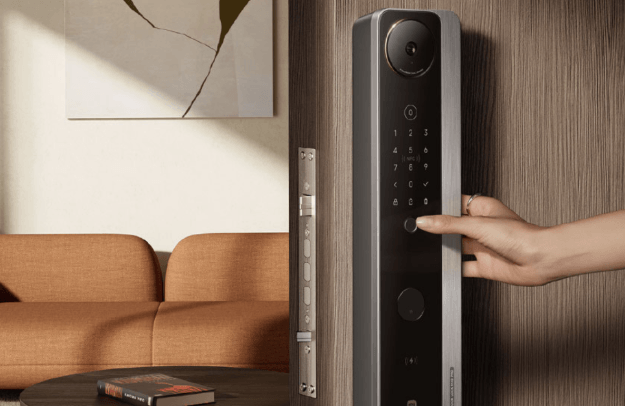
A smart door lock is an electronic locking system that allows you to secure and unlock a door using digital methods such as a smartphone app, PIN code, fingerprint, key card, or voice assistant. Unlike traditional locks that rely only on physical keys, smart door locks provide greater convenience, remote access, and advanced security features.
As smart home technology becomes more popular, smart door locks are increasingly used in homes, apartments, offices, rental properties, and commercial buildings. This guide explains what a smart door lock is, how it works, its key features, benefits, applications, challenges, and best practices.
A smart door lock is an internet-connected or wireless electronic lock that controls access to a door using digital authentication methods. It allows authorized users to lock or unlock doors without relying solely on traditional keys.
Many smart door locks also integrate with smart home systems, enabling automation and remote management.
The lock verifies a user’s identity using methods such as:
Smart locks communicate through technologies such as:
This enables remote management and smart home integration.
Once authentication is successful, the lock’s internal motor engages or disengages the locking mechanism.
Many smart locks allow users to lock or unlock doors, receive notifications, and manage access through a mobile application.
Unlock the door using a smartphone, PIN code, fingerprint, or other digital credentials.
Control and monitor the lock from virtually anywhere using a compatible mobile app and internet connection.
Create temporary or scheduled access codes for guests, family members, or service providers.
Some smart locks automatically lock the door after it closes or unlock when an authorized user approaches.
View records showing when the door was locked or unlocked and, on supported models, which user accessed it.
Many smart locks work with compatible smart home platforms for automated routines and voice control.
No need to carry or search for physical keys in everyday situations.
Grant, modify, or revoke access without replacing physical keys.
Advanced authentication methods and activity monitoring improve awareness of who enters and leaves.
Check the lock status and secure the door even when you are away from home.
Ideal for households with multiple family members or properties with frequent visitors.
Provide secure and convenient access for homeowners and family members.
Offer keyless entry and simplified guest access.
Allow hosts to issue temporary access codes for guests without exchanging physical keys.
Manage employee access and monitor entry activity.
Support digital room keys and centralized access management.
Control access to restricted areas and improve security management.
Most smart locks operate on batteries that require periodic replacement or recharging.
Remote features may be limited if the wireless connection is unavailable.
Not all smart locks are compatible with every door type or smart home ecosystem.
Some doors may require adjustments or professional installation.
Ensure the lock fits your existing door thickness, backset, and lock type.
Choose a model that supports the authentication methods you use most often.
If you use other smart devices, select a lock that integrates with your preferred smart home platform.
Choose a model with long battery life and low-battery notifications.
Look for features such as encrypted communication, tamper alerts, automatic locking, and secure user management.
A reliable, user-friendly mobile app improves the overall experience of managing your smart lock.
Protect your smart lock account with a strong password and enable multi-factor authentication if available.
Install firmware and mobile app updates to receive security improvements and new features.
Monitor battery levels and replace or recharge them before they become critically low.
Regularly review and remove access for users who no longer need entry.
Maintain an alternative way to access your property, such as a physical key or backup code, if supported by your lock.
Unlock doors quickly without relying solely on physical keys.
Receive notifications and review access history for better visibility.
Share temporary or scheduled access with visitors without duplicating keys.
Integrate door locking with lighting, security cameras, alarms, and other connected devices.
A smart door lock is an electronic locking system that allows authorized users to lock and unlock doors using digital methods such as smartphones, PIN codes, fingerprints, or key cards.
When properly installed, updated, and configured with strong account security, smart door locks can provide a high level of protection. However, users should follow recommended security practices, including strong passwords and regular software updates.
Many smart door locks provide low-battery warnings in advance. Some models also include emergency power options or support a traditional key as a backup.
Many Wi-Fi-enabled or internet-connected smart locks support remote locking, unlocking, and access management through a mobile app.
Most smart locks continue to operate locally using supported authentication methods such as PIN codes, fingerprints, Bluetooth, or physical keys. However, remote access and certain smart features may require an internet connection.
Smart door locks combine convenience, flexibility, and modern security features to improve how homes and businesses manage access. With capabilities such as keyless entry, remote control, temporary access codes, activity logs, and smart home integration, they offer a practical alternative to traditional locks. By selecting a compatible model, keeping its software updated, and following recommended security practices, users can enjoy a safer and more convenient way to secure their property.
